See The New Fuel Live Recording


CSV exports. Manual variance commentary. Board decks rebuilt from scratch every quarter. Earnings call transcripts read line by line. If you're still handling finances the hard way, boy, do I have a surprise for you.
A McKinsey survey found that 44% CFOs use generative AI across five or more use cases, yet somehow 30% still spend their valuable time crunching numbers. Others are watching from the sidelines, vaguely aware that large language models are changing finance activities everywhere they look, but not quite sure where to start.
I created a Claude finance guide together with people who also use it in finance: a VC founder who only backs CFOTech, a PwC-trained FP&A advisor with 20+ years of consulting experience and, of course, our Fuelfinance team. The full guide is free to download below.
Every other AI tool claims to suit financial services companies, every vendor promises real-time insights from your internal data. Most of it doesn't survive contact with an actual financial model.
From what I found, though, Claude understands financial context, does it fast, and gets better every month.
Most AI systems can summarize a paragraph. Far fewer can read a three-statement model, catch a broken link in a sensitivity table, or understand why a particular variance matters given the business context sitting two tabs away. Claude does all three.
Claude Opus 4.6 passed five out of seven levels of the Financial Modeling World Cup. Deployed as an Excel agent on complex tasks, it scored 83% accuracy.
Results from the Vals.AI Finance Agent Benchmark v1.1 (537 questions, quality-controlled by experts from Goldman Sachs, Silver Lake and Citadel), probably the most rigorous third-party test of AI performance on finance tasks, show:

Sonnet 4.6 leads on speed and everyday tasks like summaries and multi-step tasks. Opus 4.6 with Extended Thinking wins on complex modeling and deep research synthesis. The gap between Claude and the next choice might not look enormous, but in financial services, even a few percentage points of reliability on compliance automation, risk modeling or company financials analysis translates into real risk reduction.
A Gartner survey of 183 CFOs and senior finance leaders found that 59% are now using AI in their finance function, with 67% of those users being more optimistic about AI than the year before.
The early adopters aren't just using Claude as an AI assistant for drafting. You can apply it to anything from conducting research, processing earnings call transcripts, validating company data against external data sources to building audit trails that survive compliance requirements. AIG reports 5x faster underwriting review timelines and 75-90% data accuracy improvements.
Here are the use cases where teams consistently see the fastest ROI from using Claude for financial services, with real examples from our guide.
A well-configured Claude prompt can build a board-ready 13-week cash flow forecast inside your workbook, complete with assumptions tab, QA checks, opening cash logic and weekly sales by location, in the time it used to take a junior analyst to format the template.
Wouter Born's prompt for this (in the guide) is specific: it tells Claude to pull from your receivables, payables and payroll tabs without touching source rows, creates exactly three new tabs, uses blue editable cells for assumptions and builds in reconciliation checks throughout. You won't have to clean anything up.
Claude, configured as a senior financial controller, can handle the first pass of your monthly close: validating internal consistency across figures, flagging anything inconsistent with prior periods, identifying metrics that don't reconcile with the business model and drafting the executive summary before a human reviews it.
The Monthly Financial Analysis prompt we drafted explicitly separates the controller validation function from the strategic analysis layer. It checks calculation accuracy first, flags anomalies second, interprets the narrative third.
This pairs nicely with Fuelfinance's AI financial analysis and anomaly detection features, which catch outliers in your live data before they reach the close process.
Arguably the highest-ROI starting point for most finance teams. Paste actuals versus budget into a configured project, and Claude returns structured commentary with materiality flags, a driver narrative and a list of follow-up questions your board will probably ask.
Teams that set this up properly get a driver tree, a sensitivity summary and a reliable budget vs. actual narrative without starting from scratch each time.
From DCFs to 3-statement models to scenario planning to sensitivity tables — Claude can draft structure, write logic, flag assumption gaps and narrate implications. Carl Seidman's model builder prompt walks Claude through business context, revenue assumptions, payroll, capex and working capital timing.
A single-scenario model is a brittle model. One of the advantages of using Claude for financial modeling is the ability to stress-test assumptions instantly and get a plain-language explanation of what changes and why, turning a basic spreadsheet into something leadership can actually use for investment decisions. You need models that hold up when everyone in the room is pushing back on the assumptions.
With Claude AI chat, you just ask questions, which the LLM answers. Claude Cowork handles autonomous multi-step tasks: intercompany reconciliations, CRM-to-forecast validation, journal entry prep. Claude Skills are reusable instruction packages — you build the workflow once with careful planning, and it runs the same way every time with no re-prompting required.
This is super helpful for financial institutions and financial services firms managing high-volume, recurring workflows. A Month-End Close skill that already knows your chart of accounts, your P&L template and your variance thresholds doesn't require a prompt each time.
The full Skills setup walkthrough is in the guide.
Here's the quick-start version. If you need more help with the setup, download the guide below.
Free is too limited for real finance work. Pro ($20/month) works for individuals. For teams sharing projects and working with client data or internal data that needs to stay private, the Team plan includes a formal data processing agreement and doesn't train on your conversations. You'll need it for anything touching company financials, deal information or compliance-sensitive material.
Model selection: Claude Opus 4.6 for complex modeling, deep due diligence analysis, private equity deal work and anything requiring multi-step reasoning. Claude Sonnet 4.6 for drafting, formatting, quick summaries and high-volume automated workflows. Enable Extended Thinking for any task where you'd want a senior analyst to think before answering.
The web version handles quick questions. The desktop app adds Cowork, Claude Skills, file access and code execution — all non-negotiable if you're serious about using Claude for finance work rather than just chatting with it.
Claude Code, available through the desktop app, also opens the door to Python code automation for finance teams building custom applications or internal tools that pull from data providers and external data sources. Maybe it's not a day-one use case, but you'll use it for building more sophisticated systems.
You'll need to create three files, and ideally keep them in a folder neatly called "Claude-Finance," saved as markdown:
Our guide includes exact examples for all three. Copy them, edit for your context, and upload to your Profile Preferences. Every Claude conversation from that point forward follows these rules, without you repeating yourself.
You should also set up your writing style at this point, either from a description or from uploaded samples.
Projects give Claude persistent memory scoped to a specific workflow. Start with the ones you run most often:
Upload relevant documents to each project. Write custom instructions that tell Claude what it's doing, how you want outputs structured, and what to flag automatically.
Phew!
Now you can stop explaining your business in every conversation. Claude already knows.
Make sure to also enable Memory, so the model automatically remembers key context from conversations. You can even import your memory from GPT if that's what you've been using for finance until now.
We're building a Claude MCP integration — a direct connection between Claude and your live financial data inside the Fuelfinance platform. Your P&L, cash flow, forecasts, dashboards — accessible through Claude in a single interface, in natural language, with no export required. Ask "what's driving the margin compression in Q2?" and get an answer pulled from your real numbers.
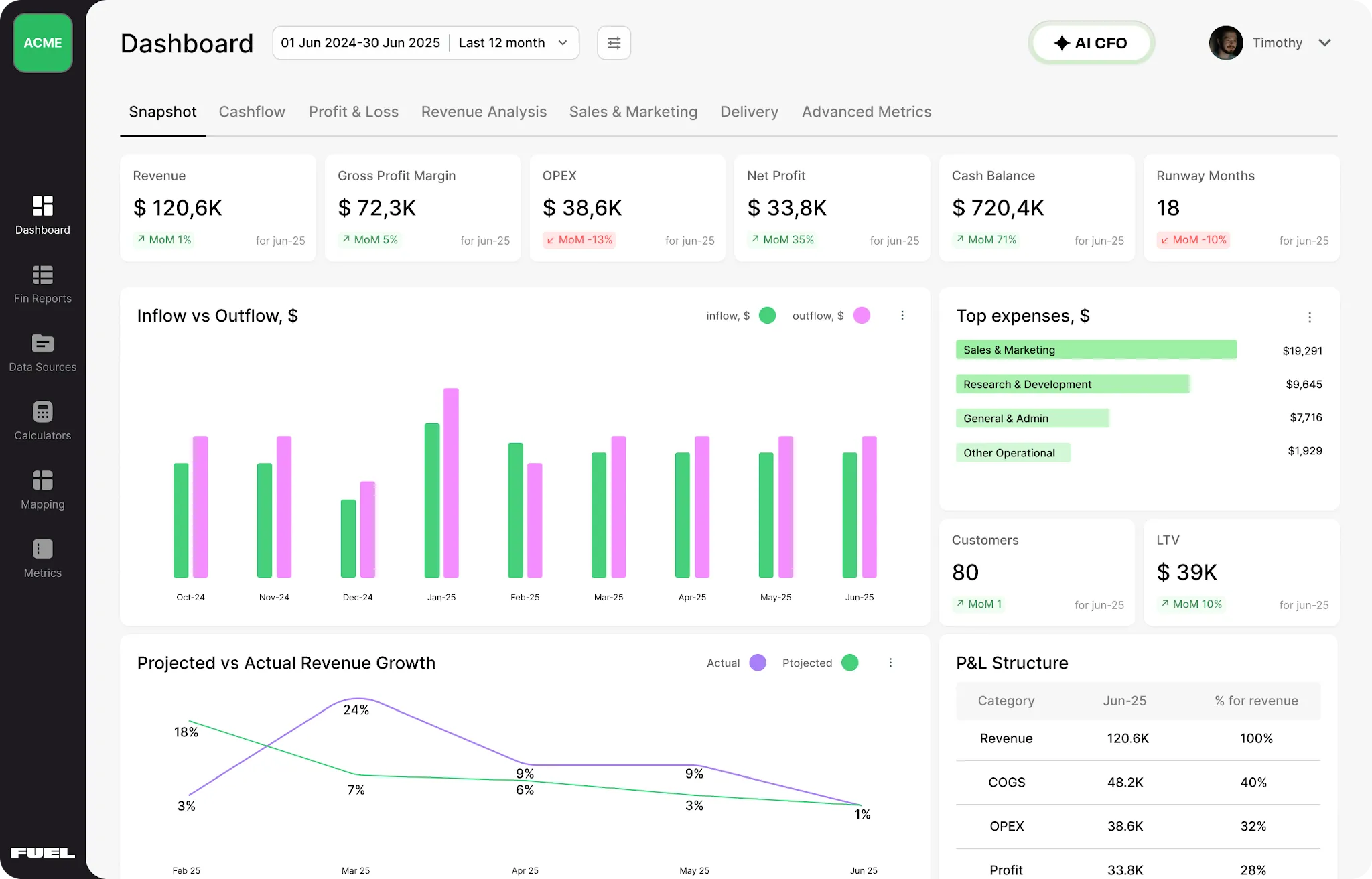
Fuelfinance also already handles the foundational work that makes AI useful: connecting over 350 tools (including QuickBooks, Xero, Stripe, HubSpot, Gusto, payroll, banks, CRMs) and consolidating everything into real-time data dashboards, automated financial reporting, cash flow forecasting and unit economics insights.
Most financial dashboard software stops at presenting numbers; Fuelfinance interprets them. The AI engine flags anomalies, models scenarios, and generates board-ready reports. A (human) finance expert reviews the data and tells you what to do with it.
The AI forecasting tools are built from your historical data across revenue, profit, marketing, sales and customer success metrics. Forecasts run monthly, quarterly and annually. Actuals update against forecast automatically, so you can see performance against projection across dashboards and can adjust strategy anytime.
Book a Fuelfinance demo if you want to check it out.
We built this because we spent too much time figuring it out ourselves. Download it, run the setup over a weekend, and enjoy better finance operations and huge productivity gains by the following week.
What's inside:
Download the free financial services Claude guide here.
On benchmark data, yes. Claude Sonnet 4.6 leads all models in the Vals.AI Finance Agent Benchmark v1.1 2026, quality-controlled by Goldman Sachs, Silver Lake and Citadel with 63.33% accuracy. GPT 5.2 sits at 58.53%. For finance professionals working with company financials, earnings call transcripts, financial analysis workflows and structured modeling, Claude's ability to understand financial context rather than just generate text makes a huge difference. A well-configured Claude setup will outperform a poorly configured one of any model, though. The configuration matters as much as the model choice.
Use Claude Opus 4.6 with Extended Thinking for complex work, like financial modeling, private equity due diligence, DCFs, multi-scenario planning, competitive benchmarking and initiating coverage reports. Claude Sonnet 4.6 for speed-dependent tasks: variance drafting, formatting, summaries and automated workflows in Cowork. Our downloadable guide includes a full model selection matrix by task type, including specific guidance for investment banking, market research and risk modeling work.
Get the Team plan, install the desktop app, build three context files — about you, your working rules, your output templates. Create projects for recurring workflows and upload relevant documents to each. Our free guide includes exact file examples and a full walkthrough.
Team and Enterprise plans include a data processing agreement and explicitly exclude your data from model training — that's the minimum for anything involving client data, deal information, material non-public information or compliance-sensitive company data. Always confirm your organization's data governance policies before uploading sensitive material to any AI tool. Financial services firms operating under specific regulatory frameworks should review Anthropic's enterprise documentation and involve legal or compliance review before deploying Claude in client-facing or audit-relevant workflows. Human review of outputs is still non-negotiable — not because Claude makes obvious errors, but because financial decisions carry consequences that require accountability.


Just imagine how that would transform your team’s productivity and focus? Talk to our financial experts to know more.