Chargebee Integrations: Best Picks by Category + What to Do With the Data
June 25, 2026
Chargebee Integrations: Best Picks by Category + What to Do With the Data
You've set up your Chargebee account. Recurring payments are going out on time. Billing information is getting captured cleanly. Someone on your team spent a full afternoon making sure the billing address fields actually sync.
And at the end of the month, you're still manually pulling numbers from four different places trying to figure out if your MRR is actually growing or just looks like it.
That's the dirty secret of subscription billing. The integration work gives you a false sense of progress, when really you've just moved the problem one layer deeper. The real challenge isn’t connecting tools — it’s making them work together in a way that gives you clear, reliable answers.
This article covers the best Chargebee integrations by category — ERP, sales, eCommerce, analytics, marketing, finance, collaboration and customer support — along with a setup guide that doesn't assume you have a dev team, and what to actually do with your data after everything is plugged in.
What can you integrate Chargebee with?
Chargebee is a subscription management platform. It handles recurring payments, billing logic, invoicing, and the general mechanics of keeping subscriptions alive.
Chargebee integrations are how you connect your billing layer to everything else — your CRM, your general ledger, your support desk, your marketing tools. Instead of someone manually exporting a CSV, reformatting it, and emailing it to ten people every Monday, the customer data just flows.
Which integration you should prioritize first depends on where your biggest operational pain is right now:
Enterprise resource planning — Sage Intacct: If your finance team is reconciling Chargebee billing information against your general ledger by hand, start here. The Sage Intacct integration pushes invoices, payments, credit notes and revenue recognition entries. Multi-entity support, ASC 606 compliance, full audit trail.
Sales — HubSpot and Salesforce: With the HubSpot integration, the goal is simple: your sales team should be able to access subscription status, customer data, MRR and payment method details without leaving the CRM. The Salesforce integration goes deeper — sales reps can create subscriptions, configure ramps and process mid-cycle changes from Salesforce at deal closure.
eCommerce — BigCommerce: Useful if you're running subscription products through an online storefront — subscription boxes, software trials with a store frontend. The BigCommerce integration keeps your site's product catalog and your billing layer in sync, so a pricing update on one side doesn't create a mess on the other.
Reporting and analytics — Google Analytics: This one is about what happens before someone becomes a paying customer. Connect Google Analytics to Chargebee to track which channels convert to subscriptions, which plans get selected most often by which audience segments, and where people abandon checkout. If you're running paid acquisition and don’t have this wired up, you're spending money without knowing what's working. Pair it with a proper financial dashboard and you've got both sides of the picture.
Marketing — Mailchimp: When Mailchimp has access to your Chargebee subscription data, your email lists automatically reflect reality — trial users get sent onboarding sequences, churned customers receive win-back flows, renewals get reminder emails without anyone manually documenting who needs what, making your marketing less generic.
Finance — Fuelfinance, QuickBooks, Xero: QuickBooks and Xero handle the accounting layer — invoices and payments from Chargebee sync automatically, keeping your books accurate without manual entry. If you're trying to decide between them, this Xero vs. QuickBooks comparison is a good starting point. Both are solid for accounting. Neither will tell you what your runway looks like in six months or which customer segment is actually profitable. That’s for Fuelfinance — and we’ll get into exactly what it does with your Chargebee data in a second.
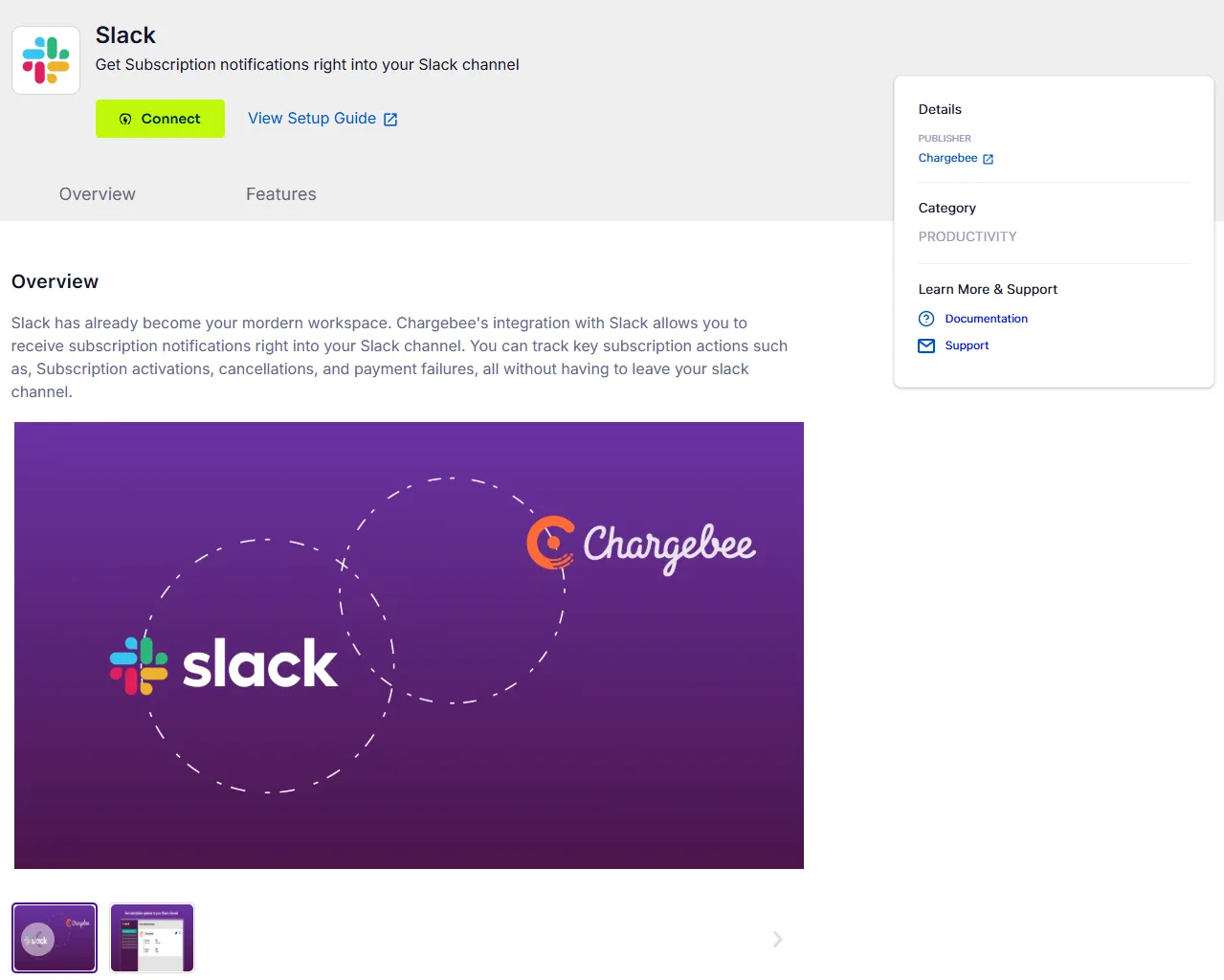
Collaboration — Slack and Intercom: Slack gets billing events pushed to the right channels in real time. New subscription? Someone sees it. Failed payment? Finance knows immediately. Key account churns? The whole team knows before reports. Intercom gives your success and support teams live subscription context inside every customer conversation.
Customer support and success — Freshdesk and Zendesk: When a billing issue comes in as a support ticket, your team should be able to see subscription history, payment method, billing address and account status without leaving the ticketing tool. Freshdesk and Zendesk both pull this from Chargebee.
How to connect Chargebee integrations
The steps are pretty straightforward for most native integrations:
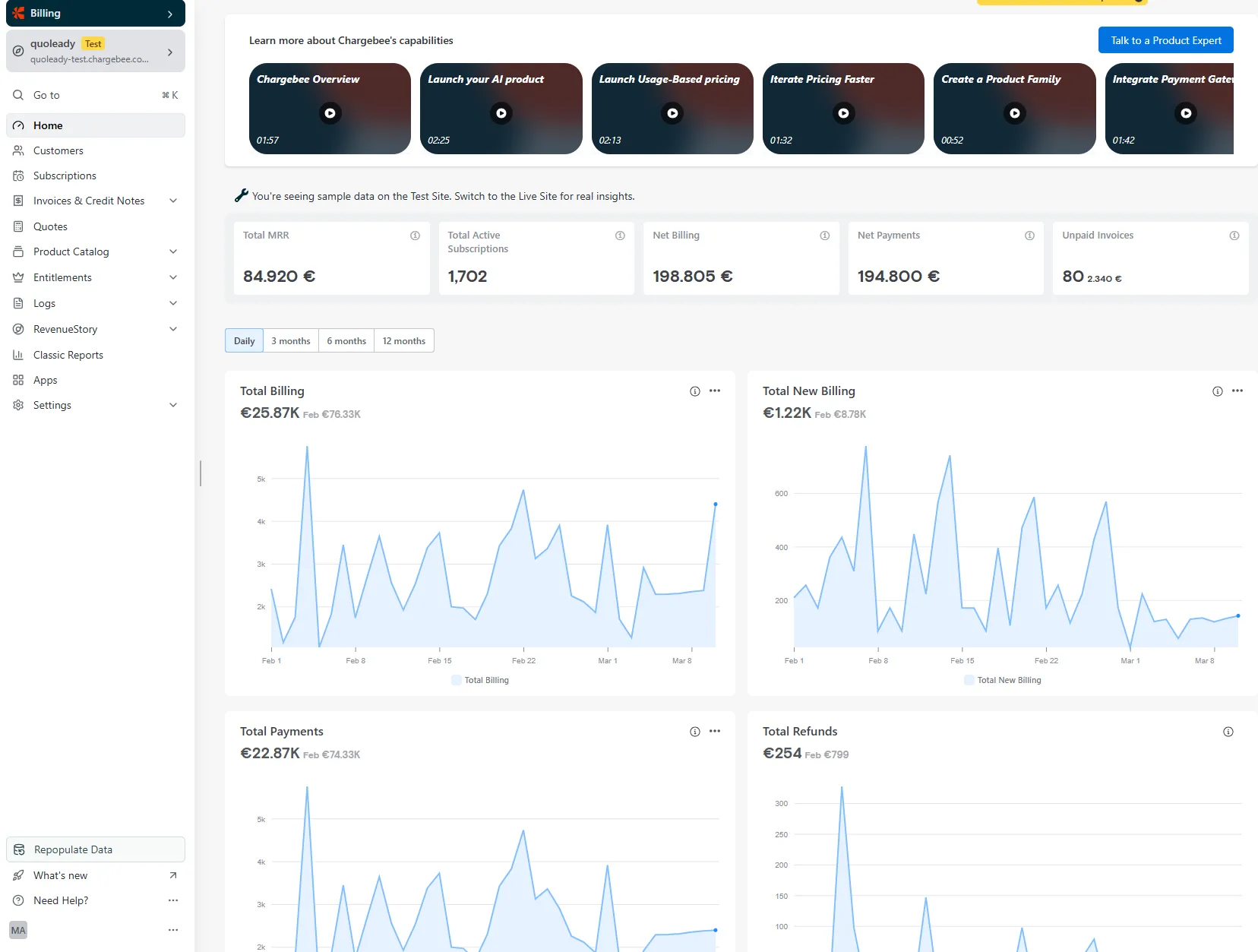
Log into your Chargebee account and find the Apps section in the left nav.
Open the Marketplace — integrations are organized by category, making it easier to search by use case.
Select the integration you want, then authenticate it. For most tools, you'll authorize the connection through an OAuth flow, you just confirm access.
Configure your sync settings. You're defining what customer data flows, in which direction, how often, and what triggers a sync.
Test everything in Chargebee's sandbox before you go live. Run some test transactions and make sure the data lands correctly on the other side. A few extra minutes here saves a lot of cleanup later.
For tools without a native integration, Zapier or Integrately can build the connector. They work fine, but they're less reliable than native integrations in the long term. Treat them as bridges, not permanent infrastructure.
Chargebee webhooks handle real-time sync. A webhook fires an event type notification to a URL you specify whenever something happens — a new subscription, a payment failure or a cancellation. If you're setting up a custom integration or working with a developer to implement something non-native, Chargebee webhooks make the data move the moment something changes, not on a scheduled script.
What to actually do with your Chargebee data
Most businesses get their integrations working and sit back. Billing is automated. The CRM is synced. Invoices are flowing to QuickBooks. Everything is connected and yet — the finance team is still manually building a deck at month end, still wrestling with spreadsheets to produce a P&L, still unable to answer basic questions quickly.
What's our real cash runway right now?
Is MRR growth sustainable or are we losing ground on churn?
Which customer segment is actually profitable after you account for support costs and infrastructure?
Where is revenue leaking, why, and when did it start?
When analytics capabilities are siloed across tools, it becomes significantly harder to create the kind of comprehensive analysis that actually informs decisions. You can have clean billing data in Chargebee, clean accounting data in QuickBooks, and clean CRM data in HubSpot, and still have no idea how your business is actually doing because nobody's aggregated it into something coherent.
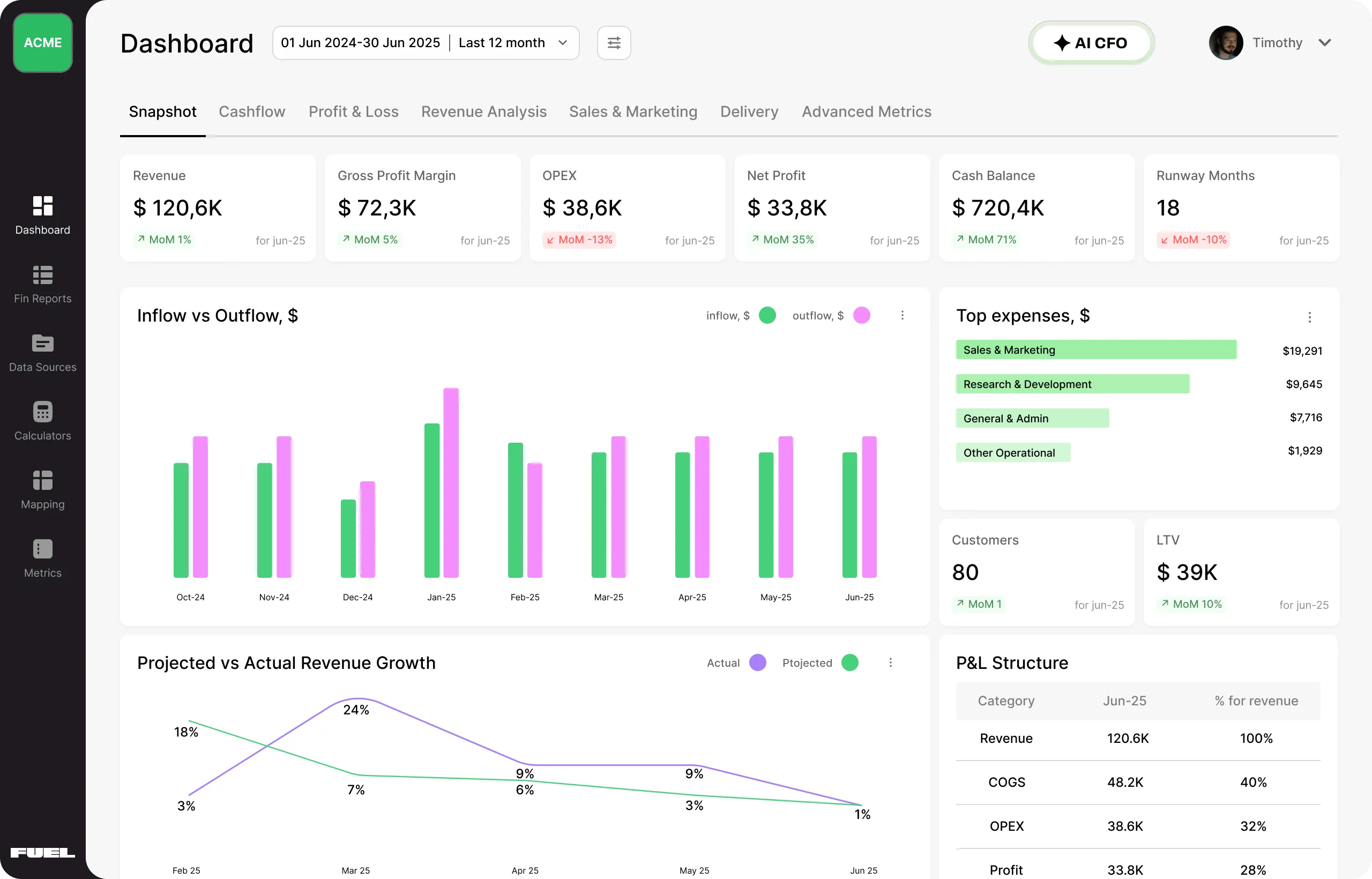
This is the gap Fuelfinance fills. It's not an accounting tool. It's not a BI tool. It's your cloud-based financial department — a combination of purpose-built software and an actual team of financial professionals that connects directly to Chargebee and 350+ other tools, then turns the raw data into financial intelligence you can act on.
Here's what happens to your Chargebee data inside Fuelfinance:
Real-time dashboards that pull billing data, expenses and payroll into one unified view that gets automatically updated, so you're always looking at current numbers
AI-powered forecasting built on your historical subscription revenue — projects cash flow, MRR and profitability for monthly, quarterly and yearly periods, with baseline (survival) and optimistic (super-growth) scenarios
Auto-generated P&L, cash flow and balance sheet reports — not a template; actual reports that process your connected data and produce outputs without you touching a spreadsheet
Anomaly detection that flags unusual billing patterns, unexpected revenue drops, or anything that looks off before it compounds into a real problem
Plan vs. actual tracking so you can see your real efficiency against plans and course-correct before the gap gets embarrassing
A dedicated finance manager — because dashboards only answer questions you know to ask, and humans catch the things you didn't think to look for
Fuelfinance client Testimonial Hero is a good example of what this looks like in practice. Before Fuelfinance, their data lived across Airtable, QuickBooks and HubSpot. Reports were manual, accuracy was questionable, and visibility into CAC, LTV and cash flow just wasn’t there. With Fuelfinance, everything now flows into one system with real-time reporting, clear unit economics and proactive CFO-level support. The result: 50% lower finance costs, 2–3× more value and numbers they actually trust.
Want to see what your Chargebee data looks like when it's organized?Book a Fuelfinance demo to see what your numbers want to tell you.
Chargebee integrations: best practices
A few things most businesses either skip or discover the hard way:
Start with your biggest operational pain, not the most popular integration. If billing reconciliation is eating days every month, connect QuickBooks or Xero first and don't touch anything else until that's working well. The fact that everyone's talking about HubSpot doesn't mean that's your problem right now.
Don't over-integrate. Every integration you add is another potential point of failure, another API to monitor, another vendor relationship to manage. Be intentional about what you actually need. A lean, well-maintained stack is more useful than a sprawling one where half the syncs are broken.
Use Chargebee webhooks for real-time data movement. If you're running a high-volume subscription business and your integrations are syncing on a weekly schedule, you're making decisions on stale data. Webhooks push an event type notification the moment something changes in your Chargebee account — a payment submitted, a subscription updated, a billing address changed.
Always test in Chargebee's sandbox. Syncing bad data into your accounting tool or CRM on day one creates cleanup work that's much more painful than taking an hour to test properly. Ensure everything maps correctly in the test environment before you go live.
Audit your integration stack every quarter. APIs get updated. Tools change behavior. Custom fields get renamed. A broken sync that nobody catches for two months is a silent reporting problem — and when you do catch it, tracing back where the data went wrong is not a fun time. Put a quarterly integration review on the calendar (and go through with it).
Quick summary: which Chargebee integrations to choose when
Your billing is connected. Now make it count.
Getting your Chargebee integrations right deserves a pat on the back. But connected data that nobody acts on is just organized noise. You need integrations that give you output that can turn into decisions that were difficult to make before.
That's what Fuelfinance is for. It's the financial management solution that connects to your Chargebee account (and Stripe, QuickBooks, Xero, HubSpot, to name a few), then gives you real-time dashboards, AI forecasting tools, automated reports, and a dedicated finance manager. We're here for any SMB, agency or growing company that's done tolerating fragmented finances.
Book a Fuelfinance demo and see what your numbers look like when they're doing their job properly.
FAQs
How do I set up a Chargebee integration?
Log into your Chargebee account and open the Apps section. Search the Marketplace for the tool you want to connect, select it and authenticate the connection. Configure your sync settings (what data flows, how often, what event type triggers an update), then test in Chargebee's sandbox before going live. For tools that don't have a native integration, Zapier and Integrately can build a connector, though these require more ongoing monitoring than native options.
Can Chargebee data be used for financial reporting and forecasting?
Yes, but not on its own. Chargebee tracks billing events and manages recurring payments. Turning that into financial reports and reliable forecasts requires connecting it to a financial layer. QuickBooks and Xero handle the accounting side. For actual strategic forecasting (runway, profitability by segment, scenario planning), you need something purpose-built. Fuelfinance connects directly to Chargebee and processes that data into automated P&L, cash flow reports and AI forecasting.
What is the difference between Chargebee's native integrations and using Zapier?
Native integrations are built specifically for the connection between Chargebee and the target tool. They support richer data flows, bidirectional sync, real-time Chargebee webhooks and custom fields mapping. Zapier is a middleware layer that can bridge tools that don't have a native integration — it works, but it adds a dependency. If a native integration exists, use it. Zapier is a fallback, not a first choice, and definitely not something you want to implement for your core financial data flows.
What should I do with my Chargebee data after setting up integrations?
Bring it into a unified financial layer. Billing data scattered across five connected tools is still scattered, you just can't see the gaps as easily. Fuelfinance pulls in your Chargebee data alongside expense data, payroll and everything else, and turns it into dashboards, automated reports, and AI-powered cash flow forecasts that update automatically, helping you make decisions with data.



.webp)