See The New Fuel Live Recording

Based on Fuel's live demo, September 30, 2026. Watch the full recording.
The AI use cases in finance that work today are the repeatable jobs your team does every day, month, or quarter: cash reconciliation, close review, financial analysis, board reporting, and invoicing. Our AI agents do the matching, checking, and drafting. Someone on your finance team reviews the exceptions and approves anything that changes a system.
We ran all of this live on September 30, 2026, the day after we launched Fuel as a multi-agent platform for finance. The demo used a test company, connected to systems such as NetSuite, BILL, ADP, Salesforce, Ramp, and Google Drive. Below is what we showed and the numbers behind it, so you can see what AI in corporate finance looks like when it does real work.
You probably know the problem. Finance still runs on Excel, and the trouble isn't Excel itself, it's the manual work inside it. The rules, formulas, and exceptions live in people's heads, and when someone leaves, that knowledge walks out with them. That's where AI in finance and accounting has to start: getting those rules out of people's heads and into something agents can follow.
Most finance people already use AI, just ad hoc. In our first live poll, most attendees said that's how they use ChatGPT or Claude. A smaller but meaningful group had built their own skills or agents, and some already run parts of their workflows on agents.
Then we asked what makes AI in the finance department hard. The answers weren't about the models:
We hit the same wall ourselves. We built agents on Claude, wrote the context, and put them in GitHub. Then keeping that context current and checking the agents' accuracy turned into the real work. Companies have had data warehouses for years, but nobody ever wrote down the layer that explains how things are done.
Our last poll asked which workflow eats the most time. Close and close review came first, then variance analysis, forecasting, and AR/AP. The use cases below follow the same jobs.
Here are five AI use cases in finance and accounting. Each one follows the same path: the job as it runs today, what the agents pull and check, where a person decides, and what comes out. We ran three of them live in the webinar; the other two are results from our first customers.
Cash reconciliation runs on fixed rules, so agents can match every line and leave your people only the exceptions. One of our first customers spent 3–4 hours a day reconciling bank accounts outside the ERP, across many accounts. Now our agents match every bank line to the ledger each morning, and the team spends about 10 minutes reviewing only the exceptions.
In the demo, the workflow reconciled 16 bank accounts. Bank data comes in through direct feeds or, for older US banks with no open APIs, as Excel exports. The first agent, the input agent, shows exactly what it pulled: NetSuite, the context layers, Google Drive, and the bank registers. If a file is missing, like a bank statement or the GL rules, it asks you for it.
Then the agents match the lines and stop wherever a person should decide:
You get a set of Excel files, a dashboard comparing GL debits and credits with bank balances, and a list of exceptions for manual review. The live run took 1–2 minutes from start to finish. Because the matching is deterministic, it gives the same result every time.
Watch the agents reconcile 16 bank accounts →
Close review is the workflow attendees voted the most time-consuming. In the demo, nine agents ran a full controlling workflow in about two hours. We kicked it off before the webinar so the results were ready to show.
The inputs were NetSuite, BILL, ADP, Salesforce, Ramp, Google Drive, and the context layers. The workflow runs eight checks with two human gates, testing every figure in the close against the general ledger and its source documents:
An orchestrator runs the sequence and stops everything if it hits a critical finding.
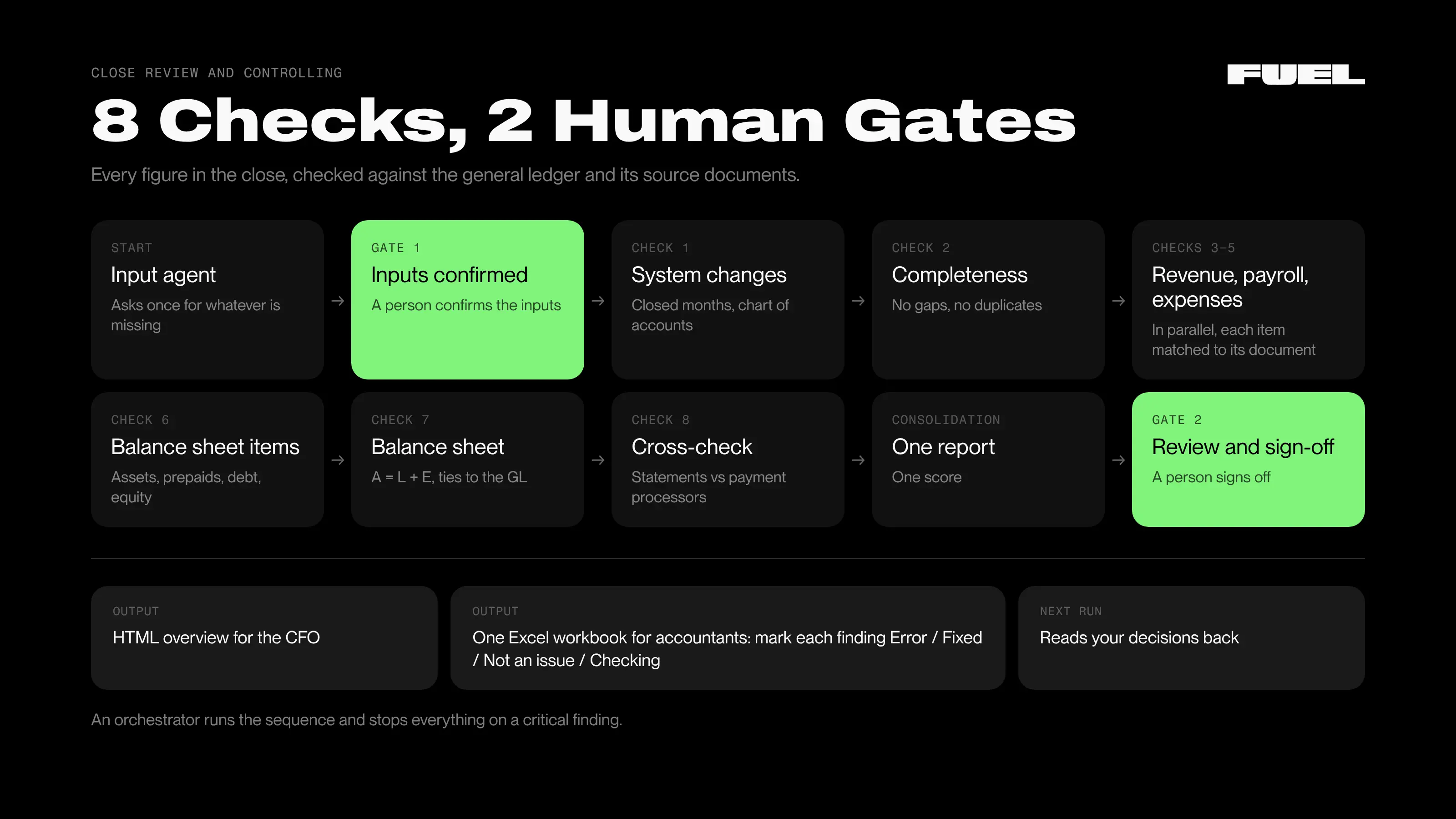
What comes out is an HTML overview for the CFO and one Excel workbook for your accountants, where they mark each finding Error, Fixed, Not an issue, or Checking. The next run reads those decisions back. At the end, the agent can propose write-back changes to the ERP. A person says yes or no to each one, and write-back only works where the agent has read + edit permission.
Agents also catch mistakes people miss. For one of our first customers, agents read every contract against invoices and billing. The mistakes and missed terms they found added 5% to ARR.
Financial analysis goes a step past matching: here the agents explain the numbers. The analysis workflow took about 10 minutes. It read the reports, the accounting system, and the CRM, then ran ratio, benchmark, and plan vs actual analysis.
The part you'll care about is the why. The agents explain why variances happened across sales, marketing, product, and revenue, and they ask you when they don't understand something. The output can be a monthly report package, a board report, an Excel file, or a deck, with the agent's confidence shown for each number, the key metrics, and suggested next actions.
In the Q&A, we described one run that covered dozens of sources in about 10 minutes and found what an FP&A manager had missed.
See the analysis in the recording →
Board reporting pulls together numbers that already sit in your reports and explains them. For our first customers, agents assemble the monthly board pack, about 150 slides, from source data, with every number tied out and the "why" behind it.
Reports come out in the formats your team already uses: Excel, PDF, HTML, PowerPoint, and Google Sheets. Our workflow library, a set of best-practice workflows with example outputs, includes a quarterly board workflow and CFO reports.
Agents don't only analyze. They can also work inside your other systems. One of our first customers runs an invoice creator: agents draft every invoice from contracts and billing data, ready for a person to approve. It cut the work from 8 hours a day to 20 minutes.
Any action an agent takes in your systems goes to a person for approval first. The workflow library also includes AR reconciliation and an AR notification manager.
Agentic AI use cases in finance work because each agent does one job inside a workflow, and the workflow chains them together. That's multi-agent AI applied to a finance team. Our library has 35+ finance agents, each doing one task, and our best-practice workflows chain 3 to 10 of them. Behind them sits a platform with five parts:
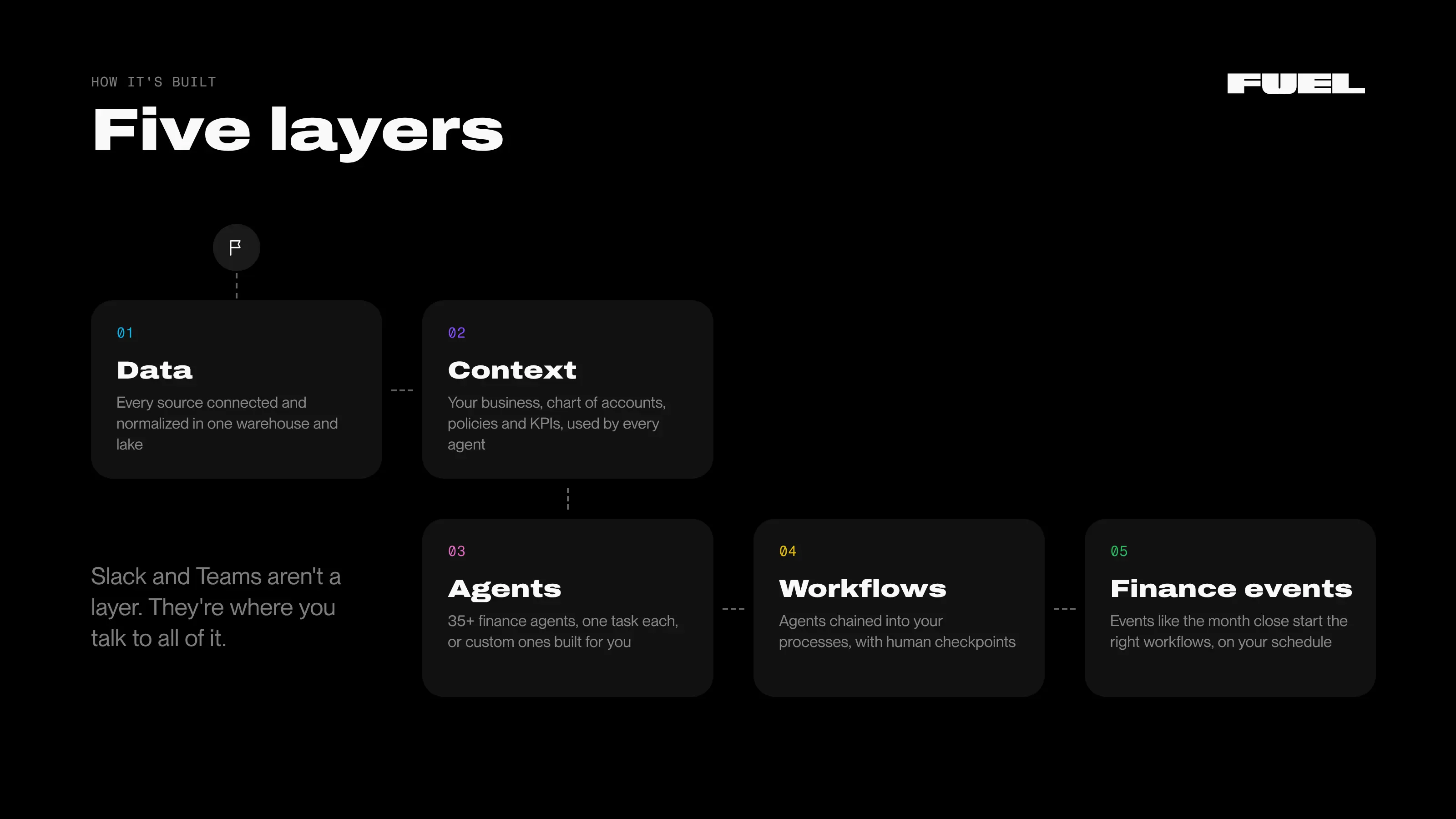
This is also the honest answer to "Can't Claude already do this?" Claude works. What's missing is the context layer, permissions, a way to keep context current (including when new models ship), accuracy checks, a library of agents and workflows, and a normalized data warehouse. Over raw MCP connections, a model makes mistakes because it doesn't know which source to trust. In Fuel, we code source-of-truth rules on the back end, such as whether revenue comes from the CRM or the accounting system, so the agents don't have to decide them.
Our agents' work comes in three types:
Excel doesn't go away, by the way. It stays as an output your team likes, but nobody has to work in it.
Data connects the same way for every workflow. Sources include accounting, CRM, spreadsheets, Google Drive (including folders, PDFs, and agreements), Excel, Airtable, payments, payroll, and warehouses, plus Slack, Teams, Gmail, and Fireflies. Any system with an MCP server connects when you paste its link, and we also integrate with Azure, BigQuery, Snowflake, and Power BI.
You check an agent the way you'd check a new team member: test it on work you already know the answer to, then review what it flags. Our Metric Engine computes every metric with deterministic code, never a model's guess. And each workflow run shows three measures:
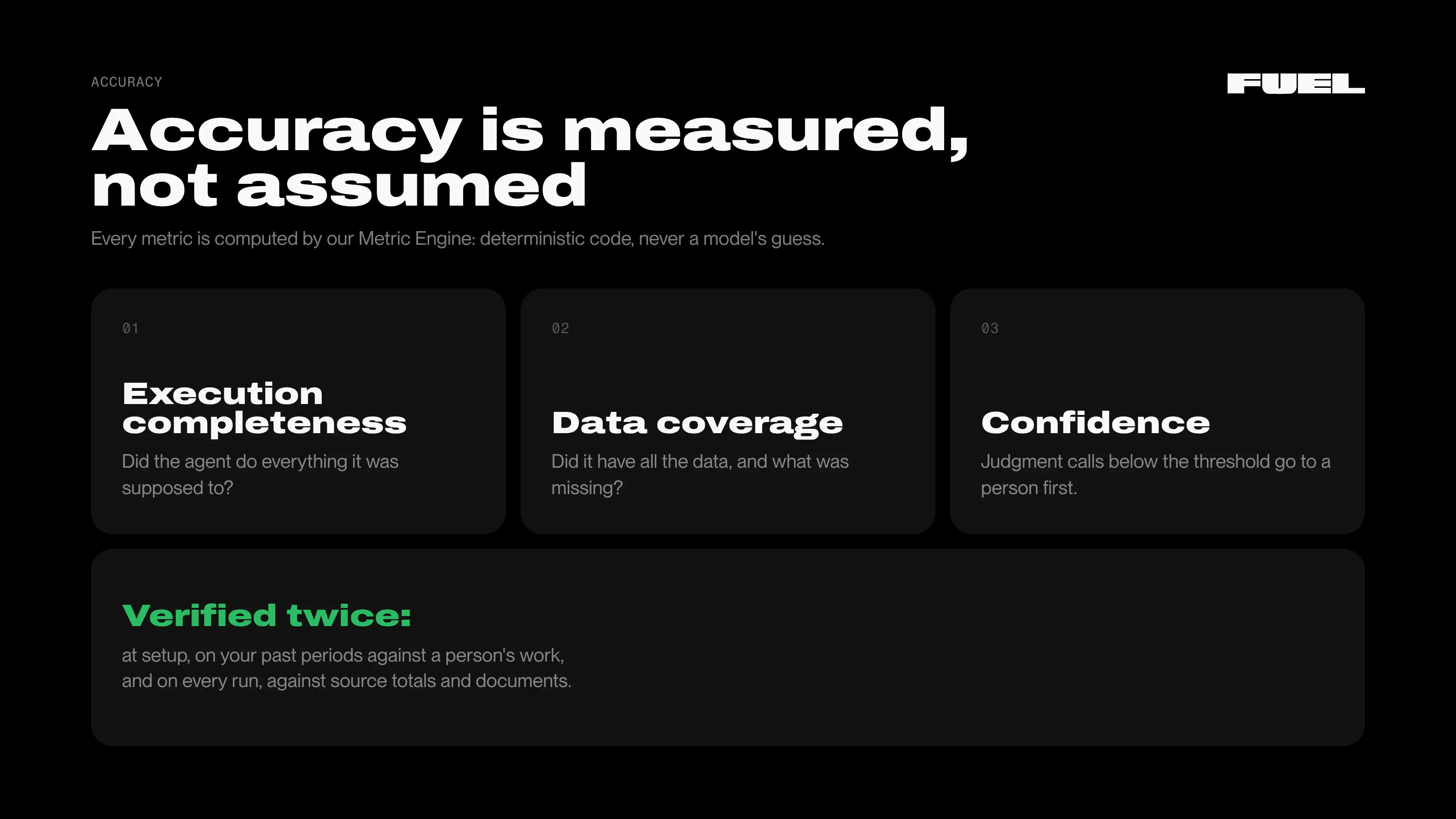
Test before you trust. You can test an agent on a previous period without saving anything. In the demo, a GL classifier sorted the test company's cash GL lines into 14 positions from a rulebook, color-coded them, and checked them against the bank and the ERP. On 250 lines from July, it matched 242 and sent 8 for review: 96.8% accuracy. We verify accuracy twice: at setup, against a person's work on your past periods, and on every run, against source totals and documents. When you correct an agent, it remembers the feedback and proposes changes to its own rules and context.
Where the data lives. Your data doesn't go into an open LLM. It's stored in the data warehouse, and the model only works with it. There are two setups: your data sits in our warehouse, or, for enterprise customers, we connect to your own warehouse and store nothing.
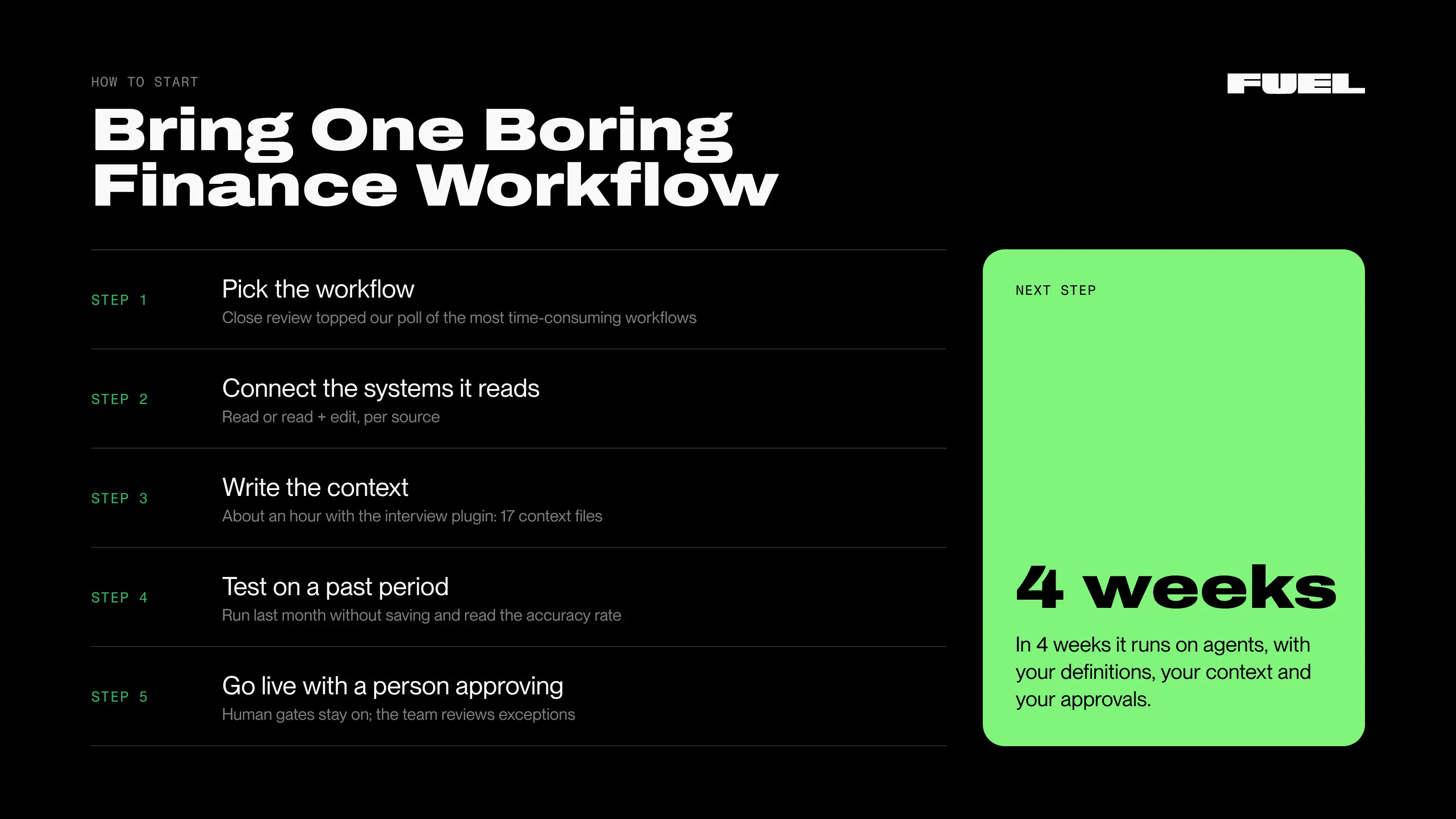
Start using AI in finance with one boring, repeatable workflow, and run it on agents before anything else. Here’s how:
You don't have to build it alone. You can build on Fuel yourself, from the library, or with one of our finance engineers. They're ex-CFOs who code, build agents, and have built data warehouses, and the custom workflows they build for you are included. Their main job is teaching your team to run an AI-native finance function, where the skill shifts from doing consolidation and reporting to controlling the agents' work.
We run a proof of concept with every new customer. Bring us one boring finance workflow, and in 4 weeks it runs on agents, with your definitions, your context, and your approvals.
More complex setups start the same way. For mid-market and enterprise customers, consolidation runs in the data warehouse across multiple QuickBooks files, 5–7 legal entities, many bank accounts, and intercompany. If you're a fractional CFO, you can switch between client companies.
This post covers what the agents did. The recording shows them doing it: the bank reconciliation across 16 accounts, the nine-agent close review, the financial analysis, and the Q&A where attendees asked how to trust agents, where data lives, and what it takes to start.
Want to see this on your own data? Bring us one boring finance workflow, and in 4 weeks it runs on agents, with your definitions, your context, and your approvals. Start with a 4-week pilot.


Just imagine how that would transform your team’s productivity and focus? Talk to our financial experts to know more.